The camera body: HOME controls and viewfinder
Every control on the HOME screen, from the top of the body to the rubber buttons at the back.
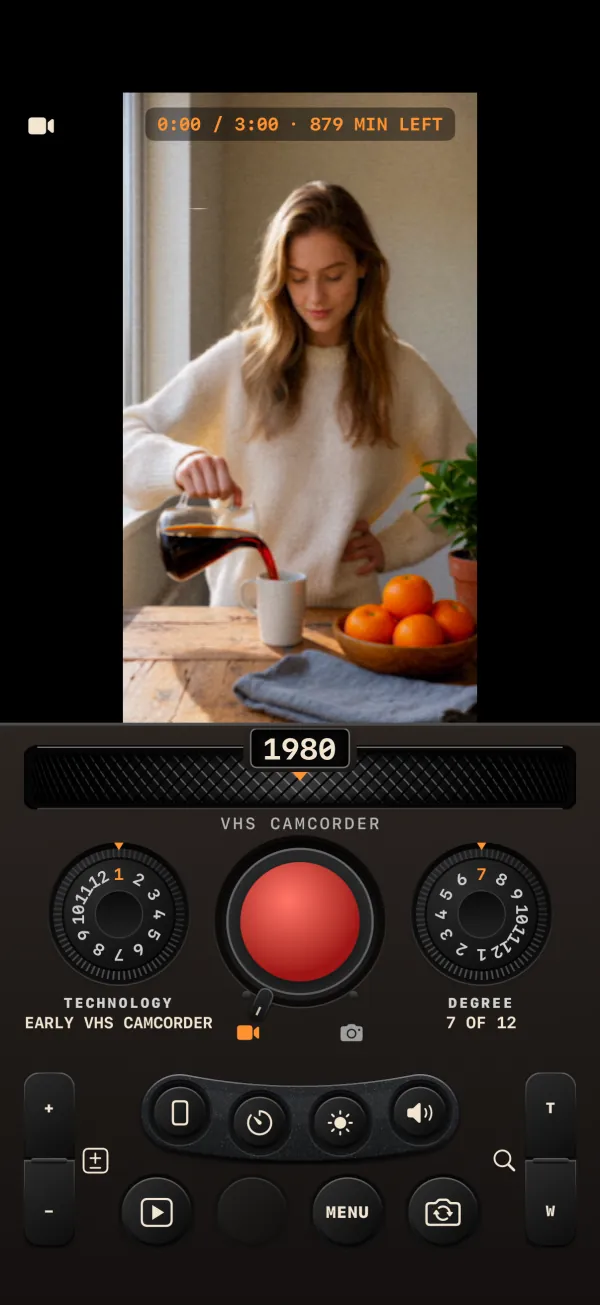
HOME is the camera itself. The panel is laid out like a body you hold in one hand, and it keeps its proportions whatever text size your iPhone uses. From top to bottom:
- the display, which is also the viewfinder;
- the DECADE thumb wheel and its caption;
- three big controls in a row: the TECHNOLOGY / STYLE dial, REC with the mode lever, and the DEGREE dial;
- a plate of four small round caps: FORMAT, TIMER, LIGHT or FLASH, and SOUND;
- the rear row of four rubber buttons: LIBRARY, LAST TAKE, MENU and FLIP.
Two rockers run down the sides of the body: EXPOSURE on the left and ZOOM on the right.
CINE and STILL
The camera has two modes, chosen with the lever under REC.
| CINE (lever left, video icon) | STILL (lever right, camera icon) | |
|---|---|---|
| REC cap | Red | Chrome |
| Left dial | TECHNOLOGY: 12 kinds of film or video per decade | STYLE: 12 kinds of photo print per decade |
| REC press | Tap to start and tap to pause, or hold to record while held | Each press takes one photo |
| FORMAT | 9:16, 3:4, 1:1 or 16:9 | Disabled: the STYLE sets the shape |
| Light | LIGHT: torch, or a white screen border on the front camera | FLASH: flash, or a white-screen flash on the front camera |
| Counter | "m:ss / 3:00" | "STILL" |
You can drag the lever or tap one of its two icons. It clunks into one of two detents either side of REC.
The controls, one by one
| Control | Physical form | How to use it | What it does |
|---|---|---|---|
| DECADE | Horizontal knurled thumb wheel, with the year in a small window above it | Drag (one click and one tap of haptics per decade), flick to let it coast, or tap its left or right half to move one decade. It resists elastically at the ends. | Chooses one of 15 decades, 1890 to 2030. See DECADE and DEGREE. |
| TECHNOLOGY / STYLE | Round dial marked 1 to 12 | Turn it around with your finger. It clicks once per step and has a hard stop at each end. | Chooses the film or video (CINE) or the print (STILL) inside the decade. The caption shows the name, for example "VHS-C FAMILY VIDEO". |
| REC | Big round button with a red or chrome cap | CINE: tap (under 0.3 seconds) to start, tap again to pause; or press and hold to record and let go to pause. STILL: press to take a photo. | While recording, the cap shows a stop square with a pulsing red ring. With the MENU open, REC closes the menu and shoots in the same gesture. |
| Mode lever | Small lever under REC | Drag it, or tap the video or camera icon. | Switches CINE and STILL. |
| DEGREE | Round dial marked 1 to 12 | Turn it like the left dial. | How strongly the decade shows, from 1 (almost clean) to 12 (pushed). 7 is the decade as specified. The caption reads "n OF 12". |
| EXPOSURE | Rocker on the left side, "+" on top and "−" below | Press for one third of a stop. Hold to repeat. | Brightness from −2 to +2 EV, default 0. It stops at the ends. The display shows an EV scale for 1.5 seconds. |
| ZOOM | Rocker on the right side, "T" on top and "W" below | Hold to zoom smoothly, let go to stop. You can also pinch the viewfinder. | From 1× up to the camera's maximum, capped at 6×. Works in both modes. |
The mini-button plate
Four small round caps with no printed labels. Each shows its value on the display when you press it, and its icon turns orange when the setting is on.
| Cap (icon) | Steps | Notes |
|---|---|---|
| FORMAT (aspect frame) | 9:16 → 3:4 → 1:1 → 16:9 | CINE only. Locked while a take is open. See Shooting video. |
| TIMER (stopwatch) | OFF → 2 s → 10 s | Applies to REC and to the hardware buttons. |
| LIGHT (sun) / FLASH (bolt) | Off ↔ on | CINE, rear camera: the torch. CINE, front camera: a white border around the viewfinder that lights your face. STILL: the flash, or a white-screen flash on the front camera. |
| SOUND (speaker; crossed out for SILENT) | From the default PERIOD: SILENT → ORIGINAL → PERIOD | Orange whenever it is not PERIOD. The display shows "♪ <MODE>" for 1.5 seconds. See Sound. |
The rear row
| Button | What it does |
|---|---|
| LIBRARY (play-in-a-box glyph) | Opens the LIBRARY. An orange dot means recovered takes are waiting there. Not available while a take is open. |
| LAST TAKE (round thumbnail) | Opens the CLIP card of your newest clip or photo. While a clip develops, its ring fills orange; tap it to go back to the developing preview. Dimmed and empty when the library is empty. |
| MENU | Opens the MENU in the display. An orange dot means exposure is not 0 or white balance is not AUTO, or that the menu is open. |
| FLIP (rotating camera glyph) | Switches between the rear and front cameras. Double-tapping the viewfinder does the same. Flipping resets the zoom to 1× and turns the torch off. Not available while a take is open. |
The rear row changes while you work. With a paused take, DISCARD and DONE take the places of LAST TAKE and MENU. After DONE, while the clip develops, UNDO with a countdown takes the place of MENU.
The viewfinder readouts
| Readout | Where | Meaning |
|---|---|---|
| Counter "m:ss / 3:00" | Top | Footage in the current take against the 3:00 tape. A red dot shows while recording. It reads "STILL" in STILL mode, and "TAPE FULL" in red when the take reaches 3:00. |
| "· N MIN LEFT" or "· <1 MIN LEFT" | Top, after the counter (CINE) | How many minutes of recording your free storage still holds. This is the first item dropped when the row is too wide. |
| "· SELFIE" | Top | The front camera is in use. |
| "· EV ±x.x" | Top | Exposure is not 0. |
| "· SUN", "· SHADE", "· BULB", "· NEON" | Top | White balance is not AUTO. |
| Mode glyph | Top left | CINE or STILL. |
| Timer glyph | Top right | A self-timer is set. |
| EV scale −2…+2 | Bottom center | Shown for 1.5 seconds after an exposure change. |
| Zoom box, for example "2.4×" | Bottom right | Always shown when zoomed in; for 1.5 seconds when you return to 1.0×. |
| VU meter | Right edge | Live sound level, only while recording in CINE with the microphone allowed. |
| Large orange digit | Center | The self-timer counting down, one tick per second. |
| "NO CAMERA" | Center | The device has no camera the app can use. |
When you take a photo the screen flashes white, briefly for the rear camera and for longer with the front camera's screen flash. When you change decade with FRAME off, the new decade's period frame appears as a faint ghost for a moment, so you can see what FRAME would add.