Taking photos (STILL mode)
In STILL the camera turns into a decade's still camera, and every photo comes out as that decade's print.
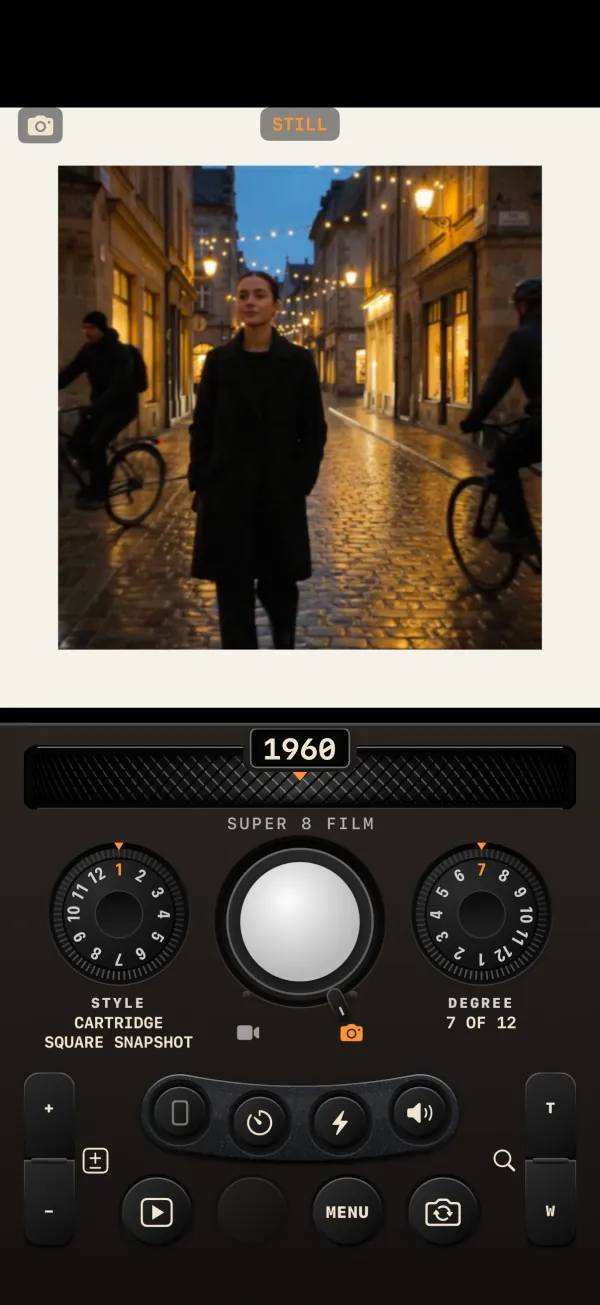
Switching to STILL
Flip the lever under REC to the camera icon. The REC cap turns chrome, the left dial becomes the STYLE dial, and the counter reads "STILL". Each press of REC takes one photo. The volume buttons and Camera Control take the photo when you release them.
The screen flashes white at the moment of the shot. The photo lands in the LIBRARY, marked with a camera icon instead of a duration, and LAST TAKE shows it.
Styles: the camera and the print
Each decade has 12 photo styles on the STYLE dial. A style is more than a color treatment: it decides the print's shape and its border, as the camera and the lab of the time did. That is why FORMAT is disabled in STILL ("CINE ONLY"). The STYLE you use is remembered between launches, separately from the TECHNOLOGY dial.
Print shapes
| Shape | Example style |
|---|---|
| Circular | Circular Roll-Film Snapshot (1890s) |
| 1:1 | Cartridge Square Snapshot (1960s) |
| 5:4 | Victorian Studio Portrait (1890s) |
| 4:3 | Pocket 110 Print (1970s) |
| 7:5 | Deckle-Edged Print (1930s) |
| 3:2 | 35mm SLR Colour Negative (1970s) |
| 17:10 | Real Photo Postcard (1900s) |
| 16:9 | Wide-Format Cartridge Print (1990s) |
| 3:1 | Panoramic Cartridge Print (1990s) |
Borders
| Border | Example style |
|---|---|
| None (borderless) | Tintype Portrait |
| White border | Box Camera Square |
| Deckle edge | Box Camera Deckle Snapshot |
| Rounded corners | Minilab Glossy Print |
| Card mount | Cabinet Card Portrait |
| Slide mount | Saturated Colour Slide |
| Photo-booth strip (four cells) | Photo Booth Strip |
| Peel-apart instant frame | Instant Colour Pack Film |
| Square instant frame | Instant Integral Square |
| Wide instant frame | Wide Instant Integral |
| Mini instant frame | Credit-Card Instant Film |
| Sticker frame | Photo Sticker Booth |
| App frame | Retro Filter App |
| Dual inset | Dual-Camera Daily Snapshot |
Some styles also carry their own date, the way the camera or the lab added one: see Date stamp and clock.
FRAME
MENU › LOOK › FRAME burns the decade's period frame into the image, on photos as on video. It is off by default and the setting is remembered. When FRAME is off, turning the DECADE wheel shows the new decade's frame as a faint ghost for a moment, as a preview.
FLASH
In STILL the third mini button is FLASH (bolt icon), also at MENU › SHOT › FLASH. It is off by default and resets at each launch.
- With the rear camera it fires the iPhone's flash.
- With the front camera it turns the screen white for the shot, held for at least 0.3 seconds, then fades: a white-screen flash that lights your face.
Resolution and the 12 MP cap
The camera takes the photo at the sensor's full resolution, then crops it to the STYLE's shape and adds the print border. The finished print, border and booth-strip cells included, is capped at 12 megapixels, and at 16,384 pixels on its longest side.