MENU and settings: every page and row
The MENU opens inside the display, like the menu of a camcorder's viewfinder.
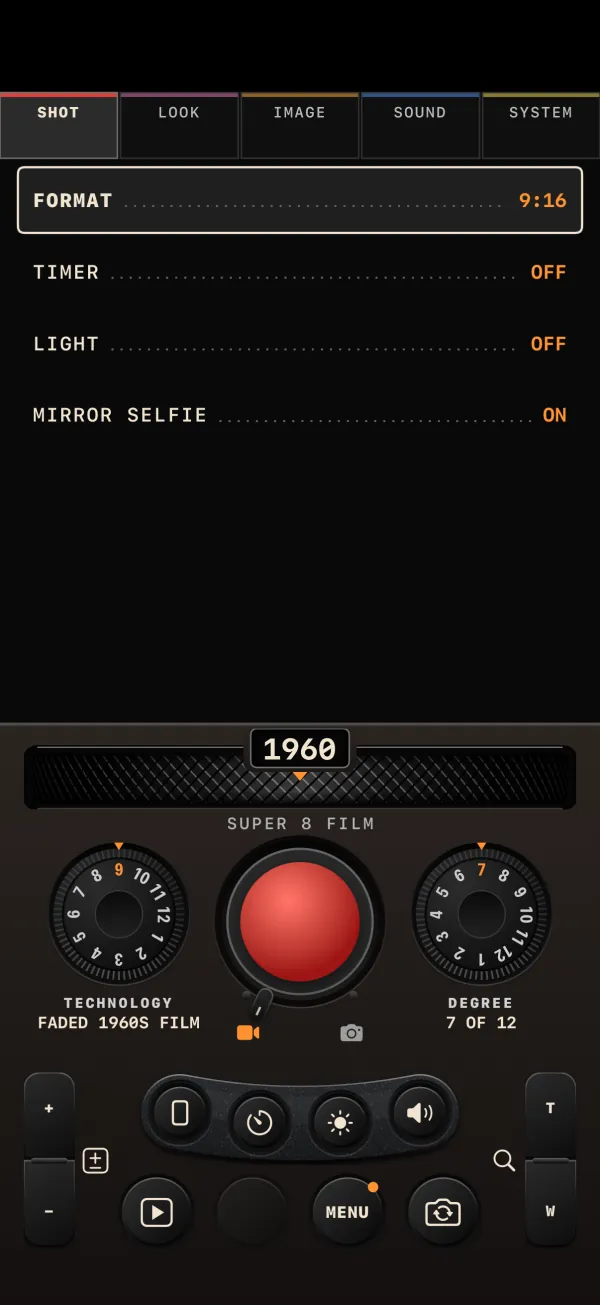
Using the MENU
Press MENU in the rear row. The display switches to the menu, with five tabs across the top: SHOT · LOOK · IMAGE · SOUND · SYSTEM. Tap a tab, or swipe sideways across the display to change page. On LOOK and IMAGE a small live preview sits at the top, in the current format, so you see the change as you make it.
- Short lists (ON/OFF and a few choices) cycle with each tap.
- Long lists open their choices under the row; tap one.
- EXPOSURE steps by 1/3 EV per tap and opens a slider under the row. Unlike the rocker, it wraps from +2.0 back to −2.0.
- Action rows (marked ›) open a page or do their job at once.
Tap outside the rows to go back to the live view. The dials and REC stay live while the menu is open: pressing REC, or a volume button, closes the menu and shoots.
SHOT
| Row | Options | Default | Kept between launches? |
|---|---|---|---|
| FORMAT | 9:16, 3:4, 1:1, 16:9 | 9:16 | No. Disabled in STILL ("CINE ONLY") and locked while a take is open. |
| TIMER | OFF, 2s, 10s | OFF | No |
| LIGHT (FLASH in STILL) | ON, OFF | OFF | No |
| MIRROR SELFIE | ON, OFF | ON | Yes |
LOOK
| Row | Options | Default | Kept? |
|---|---|---|---|
| DATE STAMP | OFF, DATE, TIME, DATE+TIME | OFF | Yes |
| DATE FORMAT | OCT 22 2026, 2026.10.22, 22.10.2026, '26 10 22 | OCT 22 2026 | Yes |
| TIME FORMAT | 12H, 24H | 12H | Yes |
| CORNER | BOTTOM LEFT, BOTTOM RIGHT, TOP LEFT, TOP RIGHT | BOTTOM LEFT | Yes |
| CLOCK | Opens SET CLOCK under the row. The row shows the stamp clock's current date. | Phone's clock | Yes |
| FRAME | ON, OFF: the decade's period frame burned into the image | OFF | Yes |
| DECADE SIGNATURE | ON, OFF: the half-second badge at the end of each clip | ON | Yes |
The date rows are explained in Date stamp and clock; the signature in LIBRARY and clips.
IMAGE
| Row | Options | Default | Kept? |
|---|---|---|---|
| EXPOSURE | EV −2.0 … EV 0 … EV +2.0, in thirds of a stop | EV 0 | No |
| WHITE BAL | AUTO, SUN (5500 K), SHADE (7000 K), BULB (3200 K), NEON (4200 K) | AUTO | No |
When exposure is not 0 or white balance is not AUTO, the MENU button carries an orange dot and the viewfinder shows "EV ±x.x" or the white-balance name next to the counter.
SOUND
| Row | Options | Default | Kept? |
|---|---|---|---|
| AUDIO | ORIGINAL, PERIOD, SILENT (the same setting as the SOUND mini button) | PERIOD | Yes |
| SPEAKER FX | OFF, LOW, MID, HIGH: the period bed in the speaker while you record, and the volume of the panel clicks | MID | Yes |
See Sound.
SYSTEM
| Row | What it does |
|---|---|
| STORAGE › | Opens STORAGE inside the display. See Storage and troubleshooting. |
| REPLAY INTRO | Runs the four intro pages and SET UP again. |
| ABOUT | Opens ABOUT: the version, the decades, the fact of the day, the privacy note and the STORAGE and REPLAY INTRO buttons. |
| RESET | Puts the shooting settings back to their defaults (below), with an undo. |
What RESET does
| Restored to default | Left alone |
|---|---|
| EXPOSURE 0, WHITE BAL AUTO, mode CINE, FORMAT 9:16 (only when no take is open), TIMER OFF, LIGHT and FLASH off, DATE STAMP OFF, FRAME OFF, MIRROR SELFIE ON, AUDIO PERIOD | DATE FORMAT, TIME FORMAT, CORNER, the clock, DECADE SIGNATURE, SPEAKER FX, the decade, the TECHNOLOGY and STYLE positions, DEGREE |
A bar reads "SETTINGS RESET" with UNDO n for 5 seconds. Tap UNDO to get your settings back.
What the camera remembers between launches
| Remembered | Starts fresh every launch |
|---|---|
| TECHNOLOGY position, STYLE position, AUDIO, SPEAKER FX, MIRROR SELFIE, FRAME, DATE STAMP, DATE FORMAT, TIME FORMAT, CORNER, the clock, DECADE SIGNATURE | DECADE (opens on the decade of the day), mode (CINE), DEGREE (7), FORMAT (9:16), EXPOSURE (0), WHITE BAL (AUTO), TIMER (OFF), LIGHT and FLASH (off) |